CineSportCam for iPhone and iPad
Stream the game. Keep score. Actually watch it.
One iPhone becomes a clean sports broadcast with a real scoreboard. Someone in the stands keeps score from their own phone. Grandparents watch on YouTube. Nobody logs into anything.
Free to start. Every Pro feature for 14 days. iOS 17 and up.

New in 2.5
The scoreboard, rebuilt.




Four scoreboard looks
Classic stays free. Broadcast, Studio and Slim join it in Pro, in your team colors.
12
sports
New in 2.5
Beach Volleyball
Already in the app
VolleyballBasketballSoccer / FootballBaseball / SoftballAmerican FootballIce HockeyLacrossePickleballBadmintonTable TennisGeneric
14
Team colors
Pick one of 14 swatches or mix your own. Each team keeps its color by name. Pro.
75%
Smaller on air
Horizontal boards now cover less of the action, and the watermark moves out of their way.
SET POINT
Advanced boards for set sports
Past set scores, a set point and match point tab, and the next set starts by itself. Pro.
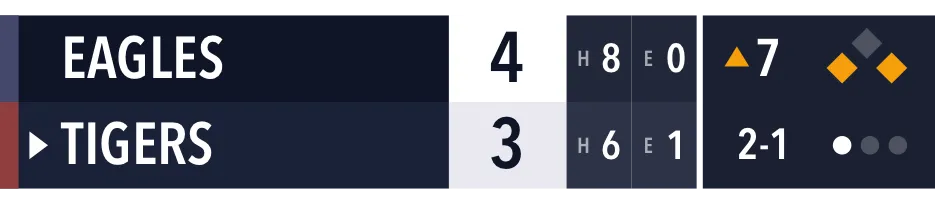
Vertical boards for the corner
Every sport now has a corner board, in two sizes. Baseball's adds hits and errors. Pro.
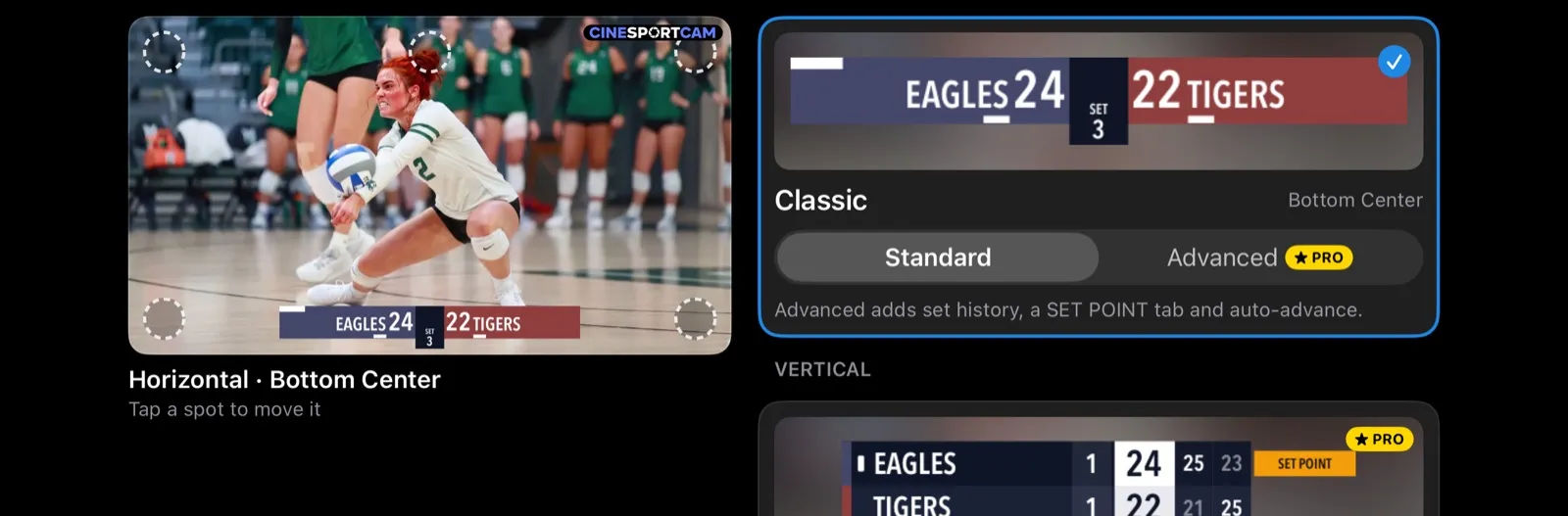
Pick your board on a real game photo
Choose the look, the style, and Standard or Advanced, then tap a spot to place it. Each style remembers its spot.
Game day
Step 1 of 4
Tap Go Live.
Pick YouTube, Facebook, or Twitch. The scoreboard is already on the broadcast, and the phone records a 4K copy the whole time.
Step 2 of 4
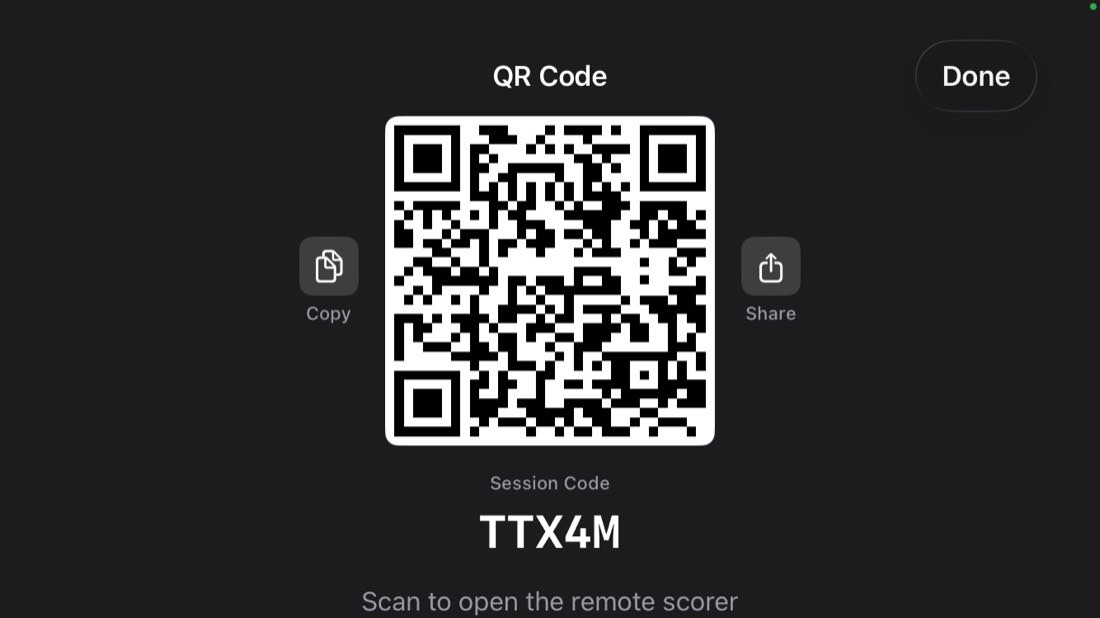
Show the QR code.
Another parent scans it with their camera app. No install, no account, no password to read out across the gym.
Step 3 of 4
They keep score. You watch.
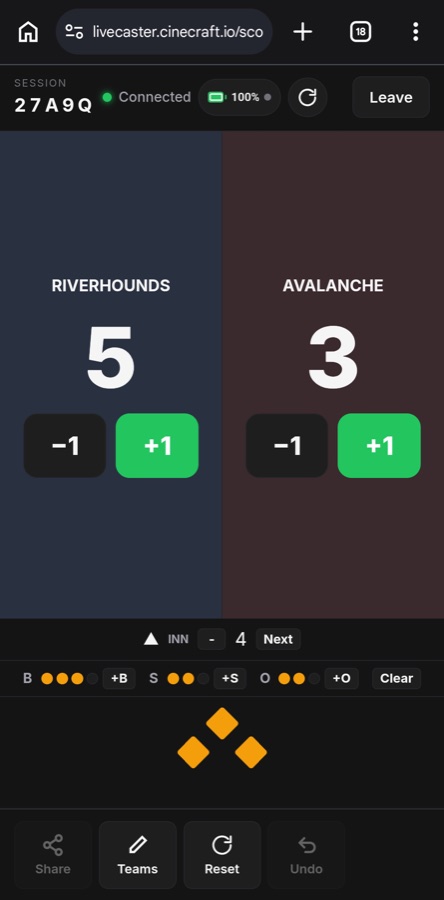
Their phone becomes the scoreboard. Every tap shows up on the broadcast instantly, and they can see stream health and your battery too.
Step 4 of 4
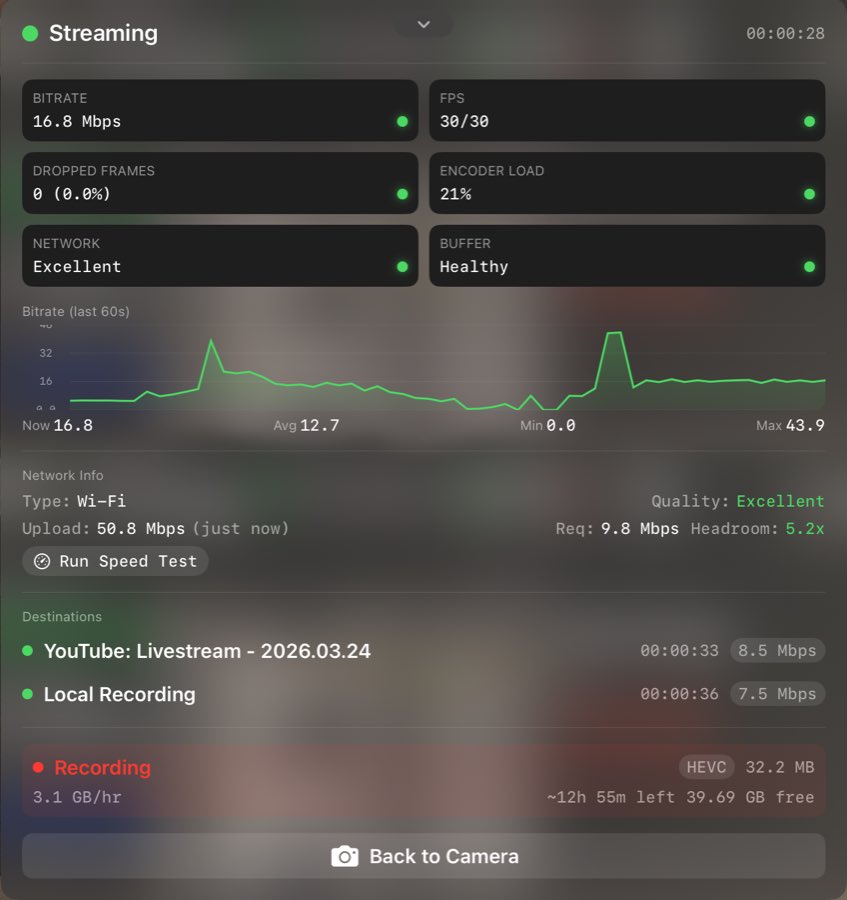
Check on it, if you want.
Bitrate, dropped frames, network, recording. Glance once, then put the phone down and enjoy the game.

Now on iPad
The whole console, on the bigger screen.
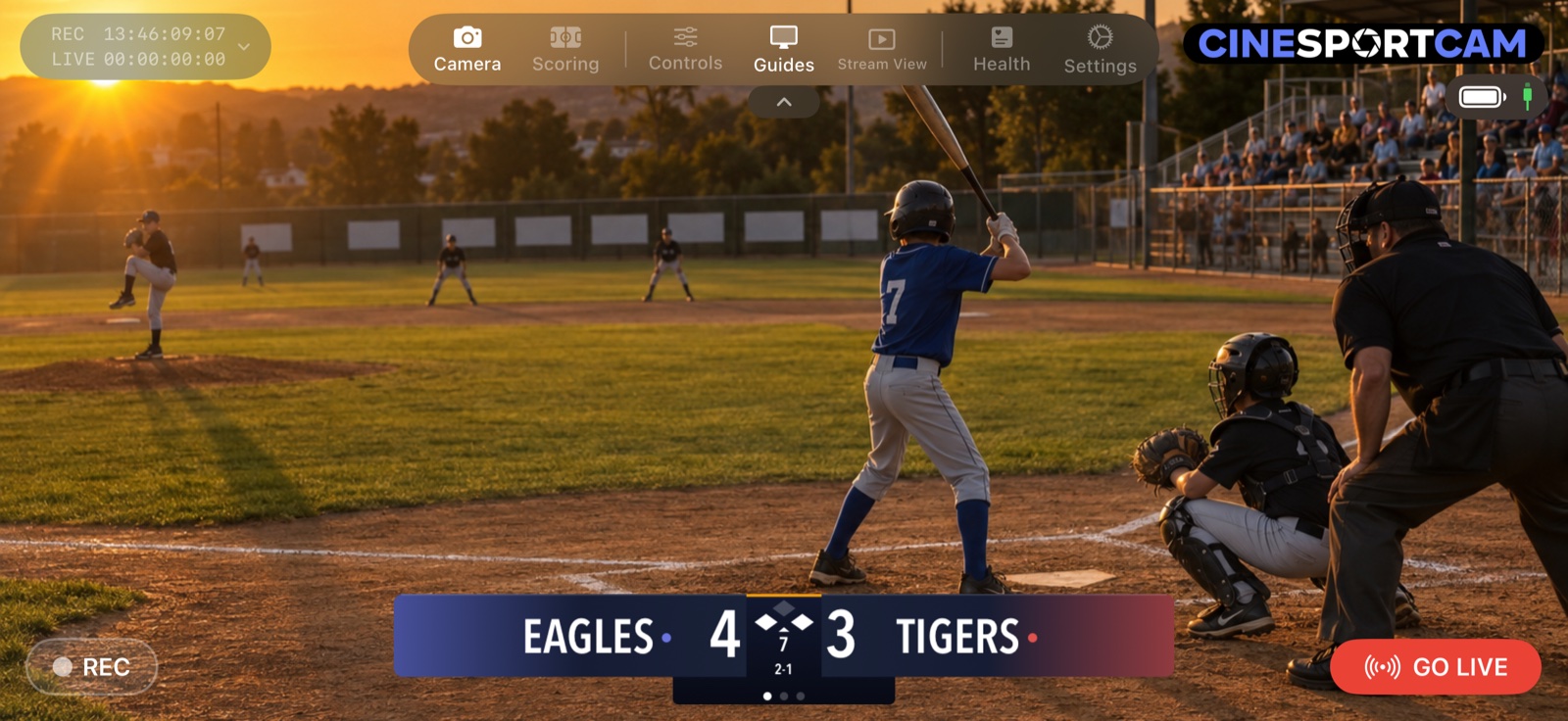
Run CineSportCam on an iPad as a full landscape broadcast and scoring console. On a tripod, or in the hands of a dedicated scorer. The preview shows exactly what viewers see, letterboxed to the broadcast frame.
Interactive demo
Try the simulator. Switch modes, tap score buttons, and explore the camera controls.
Remote scoring
Tap the score buttons below and watch the scoreboard update on the camera above.
Screens
Every screen you will touch on game day.


Watch anywhere
Get the whole family in the game, from anywhere.
Grandparents, out-of-town parents, and busy relatives watch live on the biggest screen in the house, on the platforms they already know how to open.
- YouTube on the free plan. Facebook, Twitch, and custom RTMP with Pro.
- Public or unlisted links. You decide who gets one.
- No streaming service account for viewers. Share a link, they watch.

Remote scoring
Someone in the stands keeps score. No app, no account.
Put the phone on a tripod and show the QR code. A parent scans it and taps the score from their own phone. The scoreboard on the broadcast updates instantly.
- Works in any browser, on any phone or tablet
- A five-character code when the QR is awkward to reach
- The scorer sees stream health and battery too
- Set tracking, serve rotation, and match logic handled for you
From the sideline
What families are saying
Real reactions from parents, coaches, and volunteers after game day.
“It just works!”
D. Smith · NY
“Finally a streaming app our parents can actually use.”
S. Thomas · CA
“The remote scoring saved us at regionals. Honestly a lifesaver.”
E. Hubner · GB
“Backup recording saved the day when the wifi dropped. Thank you!”
Thad Rowitz
Broadcast-ready scoreboards
A scoreboard that looks like TV on day one.
Clean animated overlays, readable scores, and a polished look make the stream feel professional, even when it is run by a volunteer on the sideline.
- Animated scoreboards built for sports streams
- Readable on phones, tablets, and TVs
- Remote score changes appear on the broadcast instantly
- Broadcast, Studio and Slim looks, Advanced and Vertical boards, and team colors on Pro
Sports
Twelve sports with a real scoreboard.
Real animated scoreboards, not a whiteboard held up to the camera. Every sport has a free Classic board, and Pro adds new looks plus Advanced and Vertical boards.
- Auto sets. The app tracks the sets or games for you. On Advanced and Vertical boards, the next one starts on its own.
- Auto outs and innings. Three outs flip the half-inning. Balls and strikes reset for you.
- Game clock. A game clock you can start, pause and set from the scoring screen.
- Rally or side-out. Pick the scoring style your league uses, with a Side Out button on the scoring screen.
- Down and distance. Down, distance, and possession on the scoreboard, from the scoring screen or the remote scorer.
- Compact layout. A smaller scoreboard you can switch to mid-game. Part of CineSportCam Pro.
- Advanced. More of the game on air: past set scores, fouls, timeouts or the clock, depending on the sport. Part of CineSportCam Pro.
Ice hockey and lacrosse add one overtime period, shown as OT 1. American football shows OT.
Game-day camera workflow
Built so the person filming can watch the game too.
A parent, coach, or volunteer gets a stable, good-looking shot fast, without becoming a live-production specialist or spending the match babysitting gear.
- Fast setup from the sideline or baseline
- One phone does the camera, the scoreboard, and the broadcast
- Framing guides and a level overlay for the perfect shot
- A short guided tour on first launch
Simple sharing
Sharing should be done before the first whistle.
Sending the stream to relatives, the team chat, or the club group should be obvious and quick before the match starts, not another support problem.
- One share flow for family and team distribution
- The remote scorer can share the stream link too
- Built for text threads, Facebook groups, and team chats
- Frees up more time for everyone to actually watch
Recording resilience
Gym Wi-Fi is a disaster. Your recording should not care.
CineSportCam records every game to your phone alongside the stream, in segments, so a dropped network or a stray ball never costs you the footage.
- Local recording runs independently of the stream
- Segmented files, so one crash cannot take the whole game
- Stream recovery and adaptive bitrate on spotty venue networks
- Move files to your Mac afterward with CineTransfer
Pricing
Free to start. Pro when you want more.
Every install starts with 14 days of Pro. After that the app stays free forever, with some Pro features reserved for subscribers.
| What you get | Free $0 forever | Pro $6.99 per month $49.99 per year Save over 40% with annual billing |
|---|---|---|
| Streaming quality | 720p at 30fps | Up to 4K at 60fps |
| Where you can stream | YouTube | YouTube, Facebook, Twitch, and any custom RTMP destination |
| Local recording | 720p, with watermark | Up to 4K at 60fps, no watermark |
| Scoreboards | The Classic scoreboard for every sport | Broadcast, Studio and Slim looks, Advanced, Compact and Vertical boards, team colors |
| Remote scoring from any phone | Included | Included |
| Watermark | Cinecraft watermark on the stream | None, or your own logo |
| NDI and HDMI output | Not included | Included |
| In-app live support | Not included | Included |
Every install starts with 14 days of Pro. All features, no restrictions, no watermark.
No paywall to record your own kid. No subscription to watch.

Teams and clubs
One purchase. The whole bench goes Pro.
Team Pass is 5 Pro seats for $199 a year. Each seat is a single-use code you hand to whoever is filming.
Team Pass
New$199 per year
Buy once, get 5 codes by email, redeem in the app. 12 months of Pro from the day you buy, no accounts to manage.
Billed in USD. Your local currency is shown at checkout.
Club editions
Running more than one team?
Club editions start at 25 seats for $799 a year, with 50 and 100 seat pools and custom sizes above that.
Viewers never pay. There is no paywall to watch a stream.
Ready for game day?
Download CineSportCam and go live at your next game.

Free to download. Pro is $6.99 a month or $49.99 a year.