Badminton scoreboard guide
Every CineSportCam badminton board, the Badminton Rules settings, how the app handles the 30-point cap and the serve, and what viewers see at game point.

For anyone streaming badminton, singles or doubles. The app tracks the games and moves the serve for you, so most of the time you only tap +1. New to the scoreboard? Start with How to set up your scoreboard.
Pick your board
Badminton has 10 boards on 6 cards in the picker: four looks along the top or bottom (each with Standard and Advanced) and two Vertical sizes for a corner. There’s no Compact board. Badminton boards say GAME where volleyball says SET.
Horizontal
Standard

Advanced

Standard

Advanced

Standard

Advanced

Standard

Advanced

Vertical


| Board | Free or Pro | What viewers see |
|---|---|---|
| Classic · Standard | Free | Player or team names, scores, the game number, the games won and the serve. You tap Next Game when a game is won. |
| Broadcast, Studio or Slim · Standard | Pro | The same, in that look and in your team colors. You tap Next Game. |
| Advanced, in any look | Pro | Adds up to 4 past game scores and a GAME POINT or MATCH POINT tab over the side that has it. The next game starts by itself. |
| Vertical and Vertical Large | Pro | A row per side with its color, games won and score, plus past games and the point tab. The next game starts by itself. |
Set the rules
Open Settings → Display → Badminton Rules while badminton is selected.
- Match Format: Best of 3 (the default) or Best of 5.
- Auto Advance Game - Delay: 5 seconds (the default), 10 seconds, 0 (immediate) or Manual (operator advances). It only appears when your board starts the next game by itself.
A format change applies at the next Reset Game, or straight away while a remote-scoring session is running.
The app follows the badminton rules for you:
- Games go to 21 and you have to win by 2, up to a cap of 30: at 29–29 the next point wins the game, so no point tab shows there.
- The side that scores the point serves.
- The winner of a game serves first in the next one.
Score a game
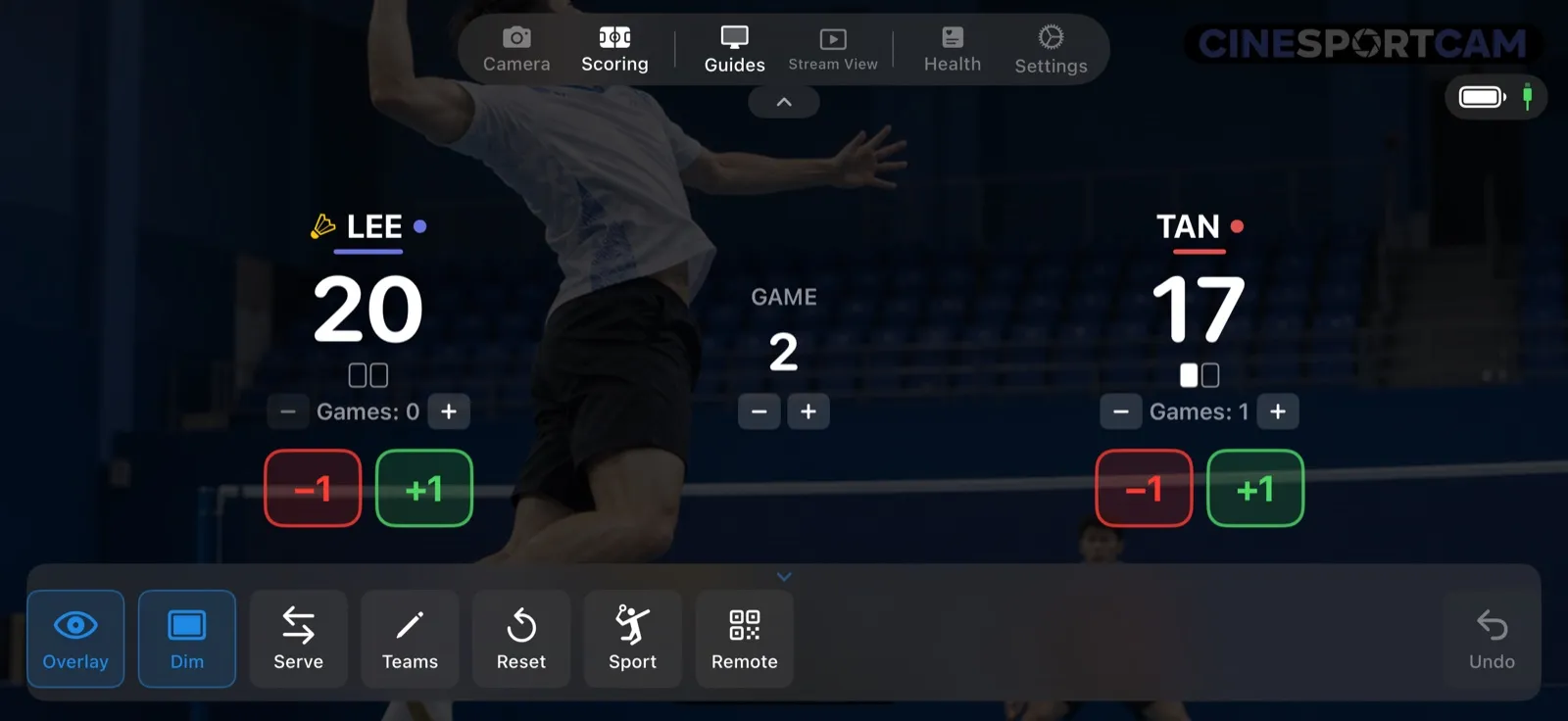
- +1 and −1 for each side.
- A box for each game needed to win, filled in as games are won, with Games: N − and + to correct the count.
- GAME with − and + changes the game number only. It doesn’t clear the points.
- Serve, in the action bar, is only for corrections: the serve moves by itself.
When a game is won, the screen says GAME COMPLETE. Tap Next Game on Standard boards, or let the countdown run on Advanced and Vertical boards.
What viewers see
TAN took the first game 21–17. Now, in game 2, LEE leads 20–17 and is serving.
- Game point. LEE needs one more point, so the Advanced and Vertical boards raise a GAME POINT tab over LEE. It’s not match point yet: the games would be level at 1–1.
- The game is won. The board holds the score while the countdown runs, or until you tap Next Game.
- The next game. The scores go back to 0–0, the game number moves on, and game 2’s score joins the past games. LEE, who won the game, serves first.
Remote scoring
A scorer in the stands can run the whole match from their phone’s browser: the score buttons, the serve, the game buttons, the point banner, Next Game or the countdown, and the winner at the end. See the remote scoring guide to start a session.
Tips
- The serve moves by itself. Use Serve only to fix a mistake.
- No flag at 29–29. The next point wins the game, so the board doesn’t raise a GAME POINT tab there.